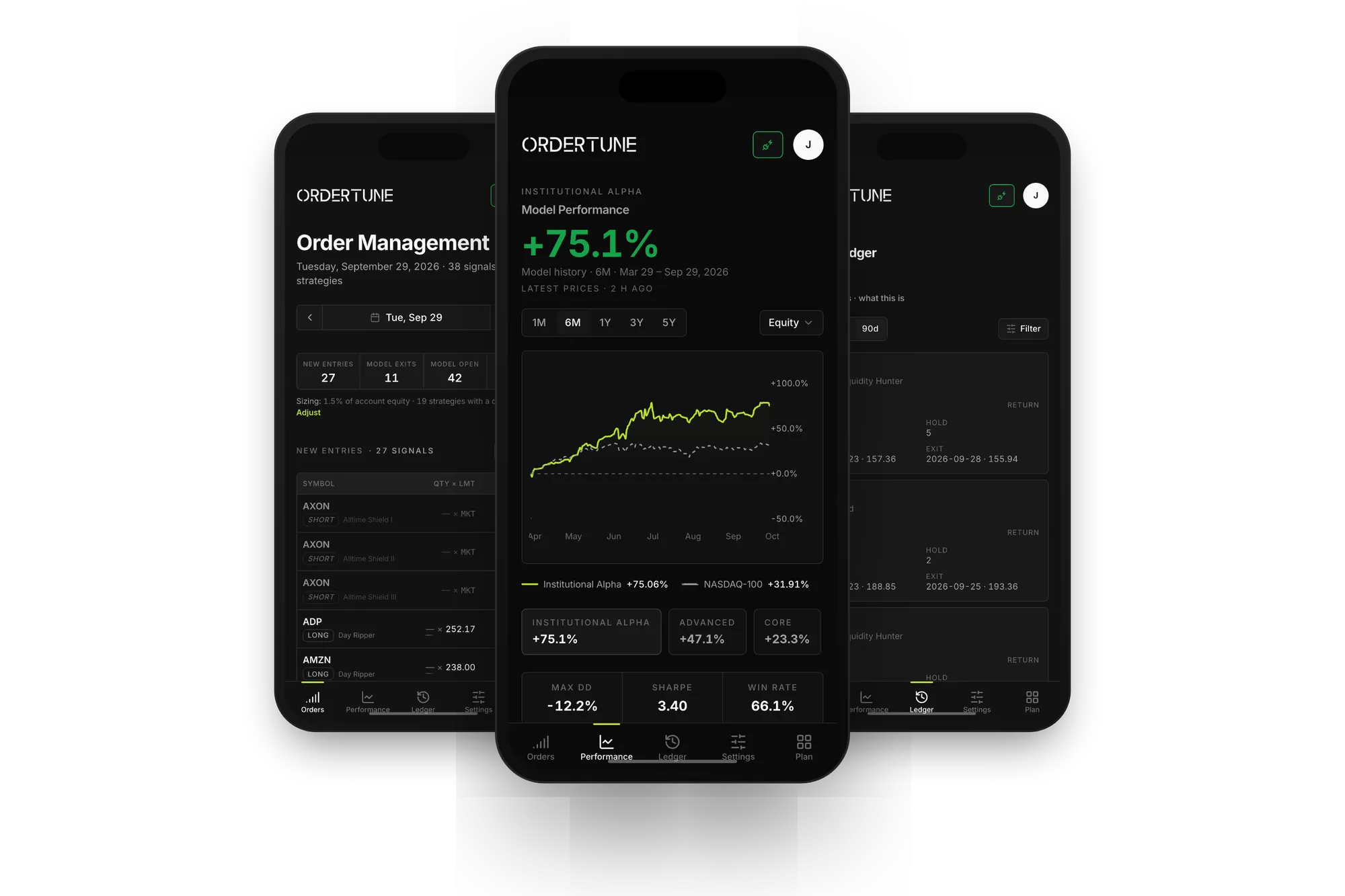
Built in-house. Owned end to end. One job: getting you from a signal to a released order without a spreadsheet in between. Here is one real trading day.
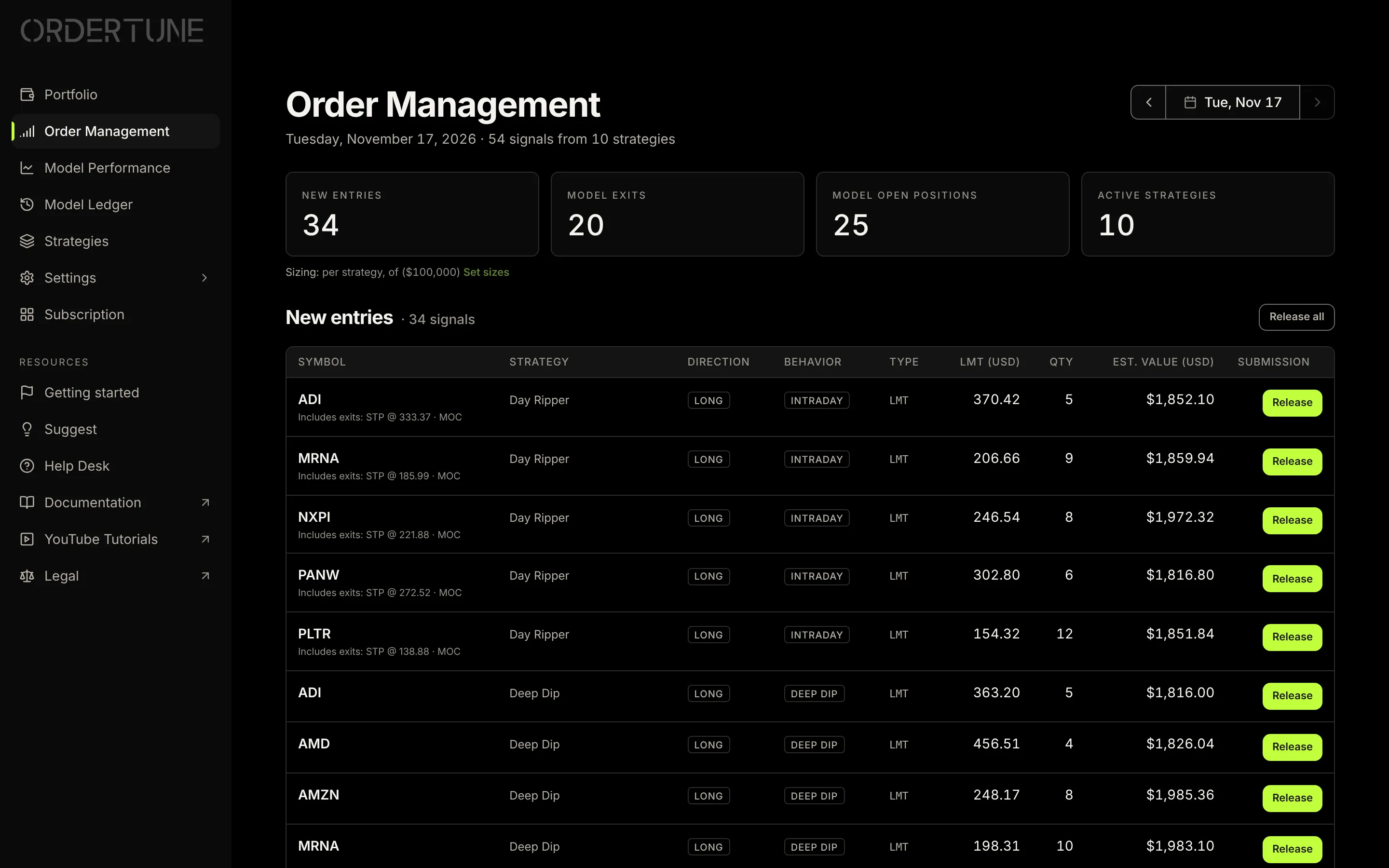
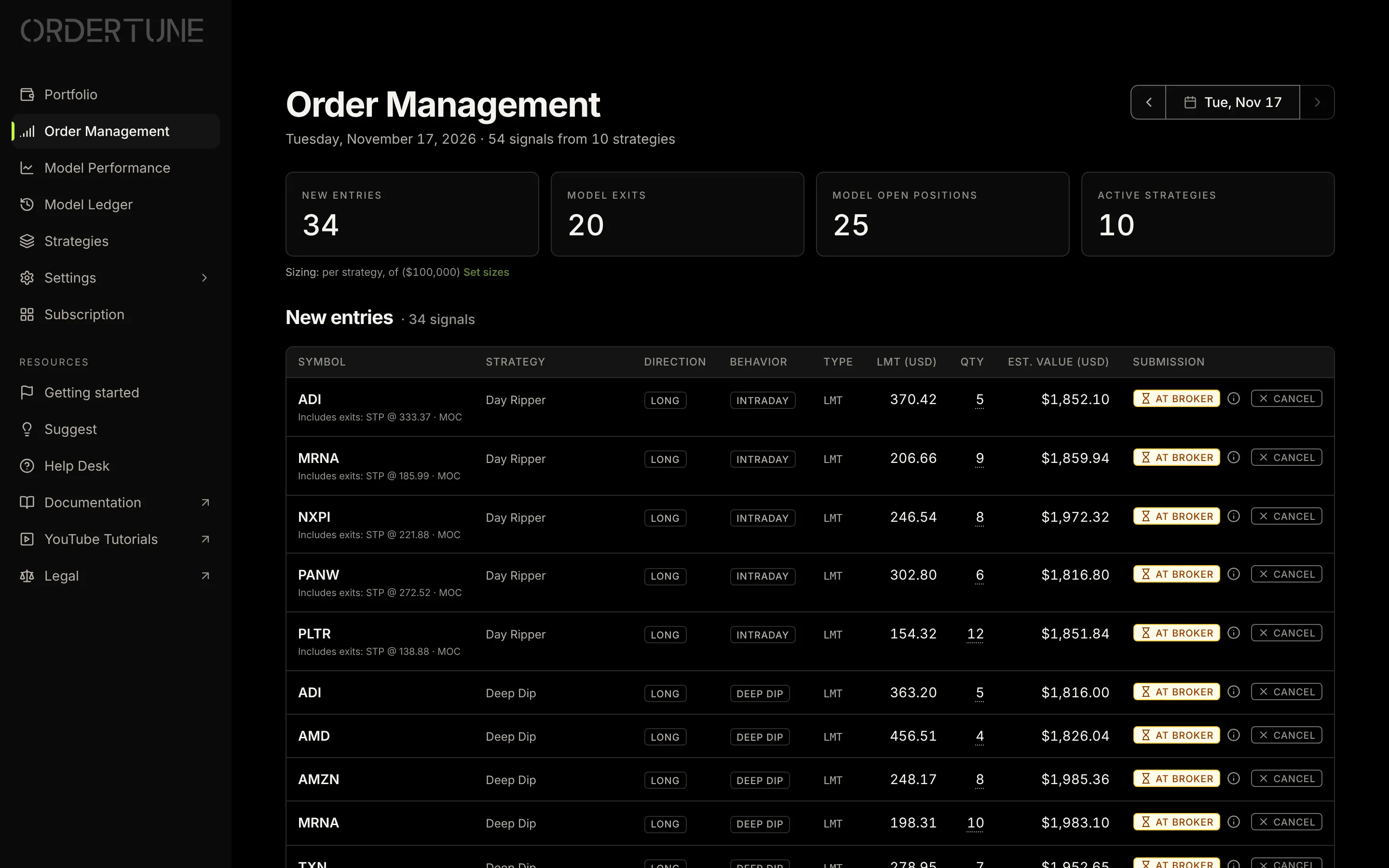
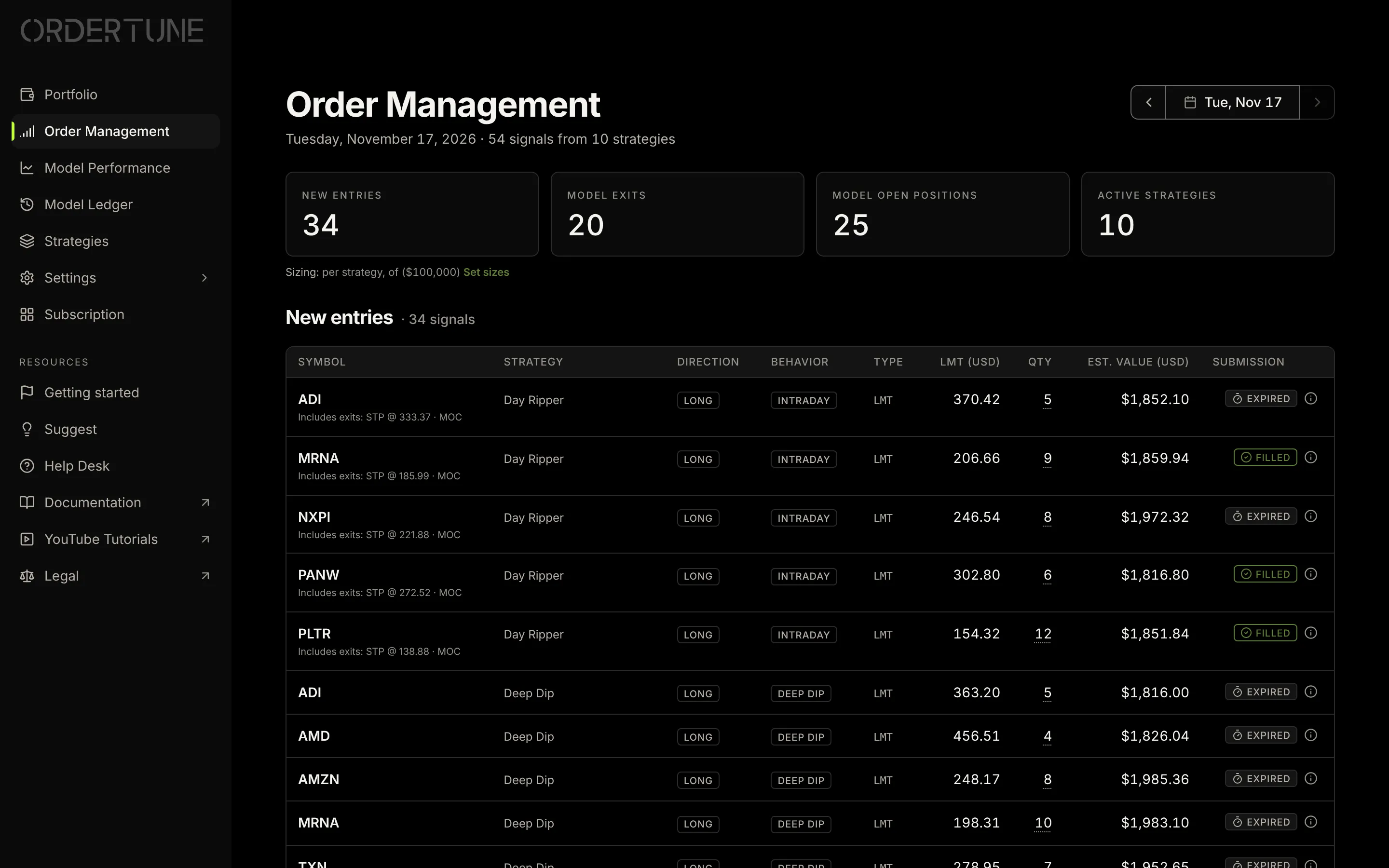
This is not a mock-up. The film and the three screens below are rendered from the code of interactive.ordertune.com, with the signals the model produced on 17 November 2026 for the strategies of Institutional Alpha. The example account sizes every new trade at 2 % of $100,000; yours uses the size you set.
The film · 17 November 2026
The last click is always yours.
Hosted on YouTube. Only when you press play does your browser connect to YouTube (Google) and transmit your IP address. Open on YouTube instead
Morning · The plan is in
54 signals from 10 strategies, hours before the bell.
The run lands on your dashboard between 10:00 and 10:05 CET. The opening bell in New York is at 15:30. On this Tuesday the model had 34 new entries and 20 exits. Every row says which strategy it comes from, the direction, the behaviour, the order type, the limit and the quantity computed from your own position size. Intraday entries carry their exits in the same row: “Includes exits: STP @ 333.37 · MOC” is the stop and the close-out that come with that order.
One Click · Released
You release the plan. The Bridge on your machine places it.
Release all, or row by row. A released order waits for the Bridge on your own machine, which asks Ordertune once a minute and hands it to your Trader Workstation. The row then reads “At broker” and can still be cancelled. Nothing goes out that you have not released. The last click is always yours.
After The Close · Filled or expired
Limits are limits. Nothing is chased.
A limit order fills at its price or better, or it expires. On 17 November 13 of the 34 entries filled; the other 21 expired at their limit or their time window. Every fill lands in the model ledger with entry, exit and return, the losers included.
What else sits on Order Management:
Your exits. An exit leaves only once you have released it, one at a time or all at once, and an email tells you when exits are waiting. Exits that come with an intraday entry are released together with that entry.
Still open to join. Entries from earlier trading days that are still valid, for when you missed the day or joined later.
Pending at your broker and Held outside Ordertune. What is working at IBKR right now, and the positions in your account that the model never asked for.
Total Ownership
No middleman. No content-creator platform. Just you and the signal.
The Ordertune App lives at interactive.ordertune.com: our domain, our code, our database. Every euro you pay fuels research and infrastructure, not a marketplace commission, a Discord bot or a Telegram channel admin. We don’t make a cut on your trades: no commissions, no spread games, no data resale. You pay a flat monthly subscription, and there is no performance fee.
The Ordertune Bridge
The typing is the part we removed.
The Ordertune Bridge
A small program, next to Trader Workstation.
It collects the orders you released in the Ordertune App, hands them to Trader Workstation over a local connection and reports back what happened. That is the whole job.
Ordertune
interactive.ordertune.com
Signals, sizing and the release you give. Holds no broker credentials.
released orders← fills, positions
Your machine
Ordertune Bridge
Runs where you run TWS, on Windows or Linux. Holds your token. Off when your machine is off.
local socket← order status
Interactive Brokers
Trader Workstation
Your own login, your own account. IBKR’s local interface accepts only this machine.
Setup
1
Prepare Trader Workstation
In TWS · 10 min
2
Download the Bridge
In the Ordertune App · 2 min
3
Start it and pair it
Your machine and the app · 10 min
4
Confirm the connection
In the Ordertune App · 1 min
What it does not do
Nothing reaches your broker on its own. An order is sent only after you release it.
Ordertune never sees your IBKR credentials. There is no key to paste.
The Bridge does not run in our data centre. If your machine is off, nothing is sent.
Interactive Brokers does not offer retail OAuth, so there is no key to paste and no third party to trust. Instead you run one small program — about 24 MB — on the same machine as Trader Workstation. It asks Ordertune once a minute whether you have released anything, hands those orders to TWS over a local connection, and reports back what happened. It is open source under the MIT licence, and every release is built by a public workflow from a tagged commit. You can read both the code and the build.
Three things it does not do, which is usually the more interesting list:
Nothing reaches your broker on its own. An order is sent only after you release it in Order Management. Ordertune does not trade for you, and it cannot.
Ordertune never sees your IBKR credentials. You switch on IBKR’s own local interface, which accepts connections only from the machine it runs on.
The Bridge does not run in our data centre. It runs on yours, holds your token, and talks to your Trader Workstation. If your machine is off, nothing is sent.
Setting it up takes about half an hour the first time, in four steps, and every one of them is written down in the Broker Setup help. Start with an IBKR paper account — every step is identical for a live one, and a mistake in a paper account costs nothing.
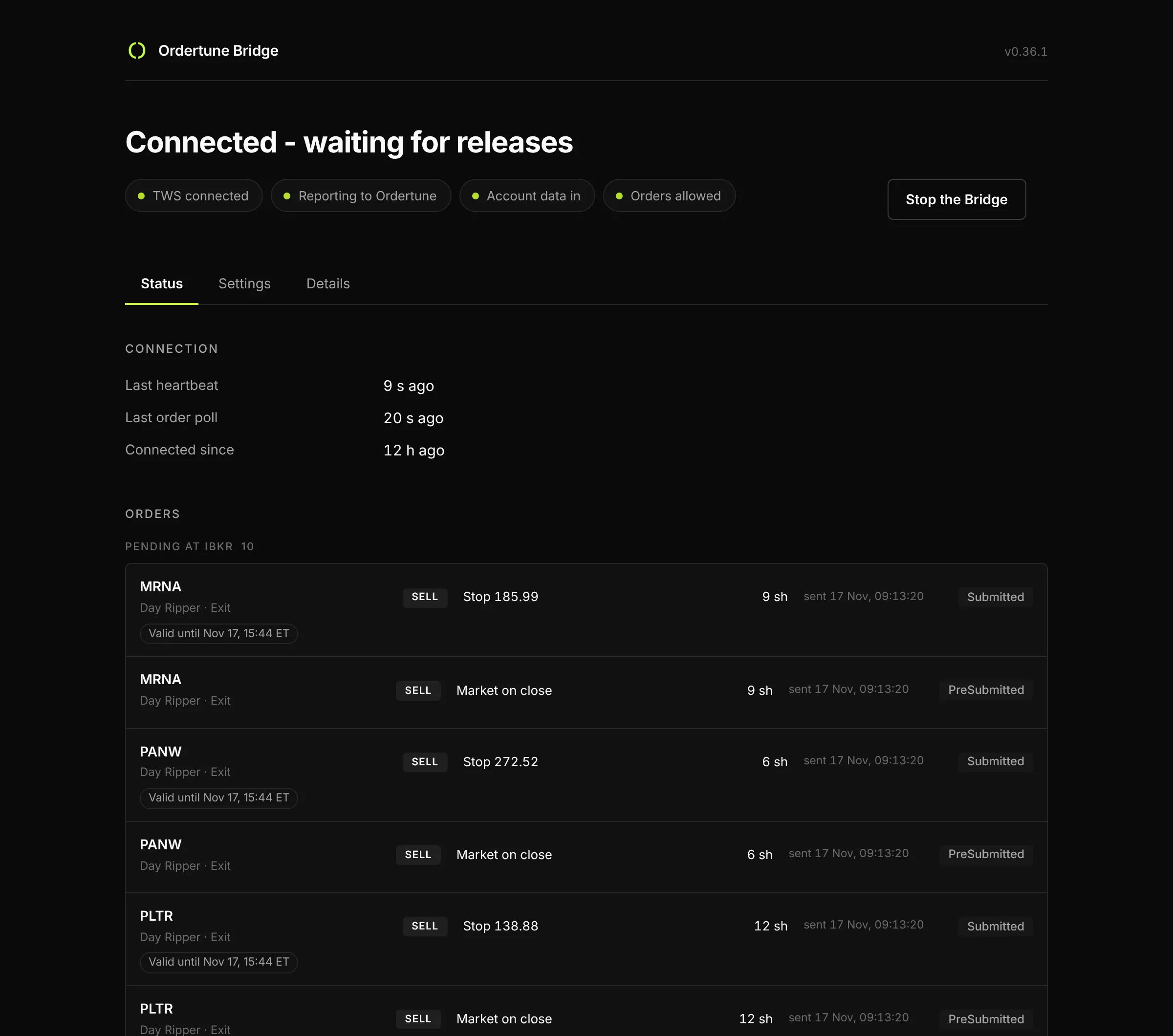
The Bridge window as its current code renders it, with an example paper account on 17 November 2026.
On Your Machine
A verdict, not a log file.
When the Bridge starts it opens a window that answers one question: is this thing working right now? A sentence at the top, then four lamps — Trader Workstation, Ordertune, account data, order access.
If a lamp is out, the window says which switch in TWS is wrong and what to do about it. Most first-time failures are a socket port, and the port is a setting in Trader Workstation that does not follow from your account type — so the Bridge goes looking for it instead of asking you to guess. Pairing is a five-digit code the Bridge shows you and you type into Ordertune. Ordertune then asks you to confirm the machine by name and hardware fingerprint. No token is ever typed by hand.
Model Performance
Every trade the model ever took. Every drawdown — on the same screen.
Start at the size the app suggests for your tier, then slide anywhere from 0.25 % to 7 % per new trade and watch the curve and the drawdown change with it. Statistical sovereignty is not a slogan. It is a screen you check.
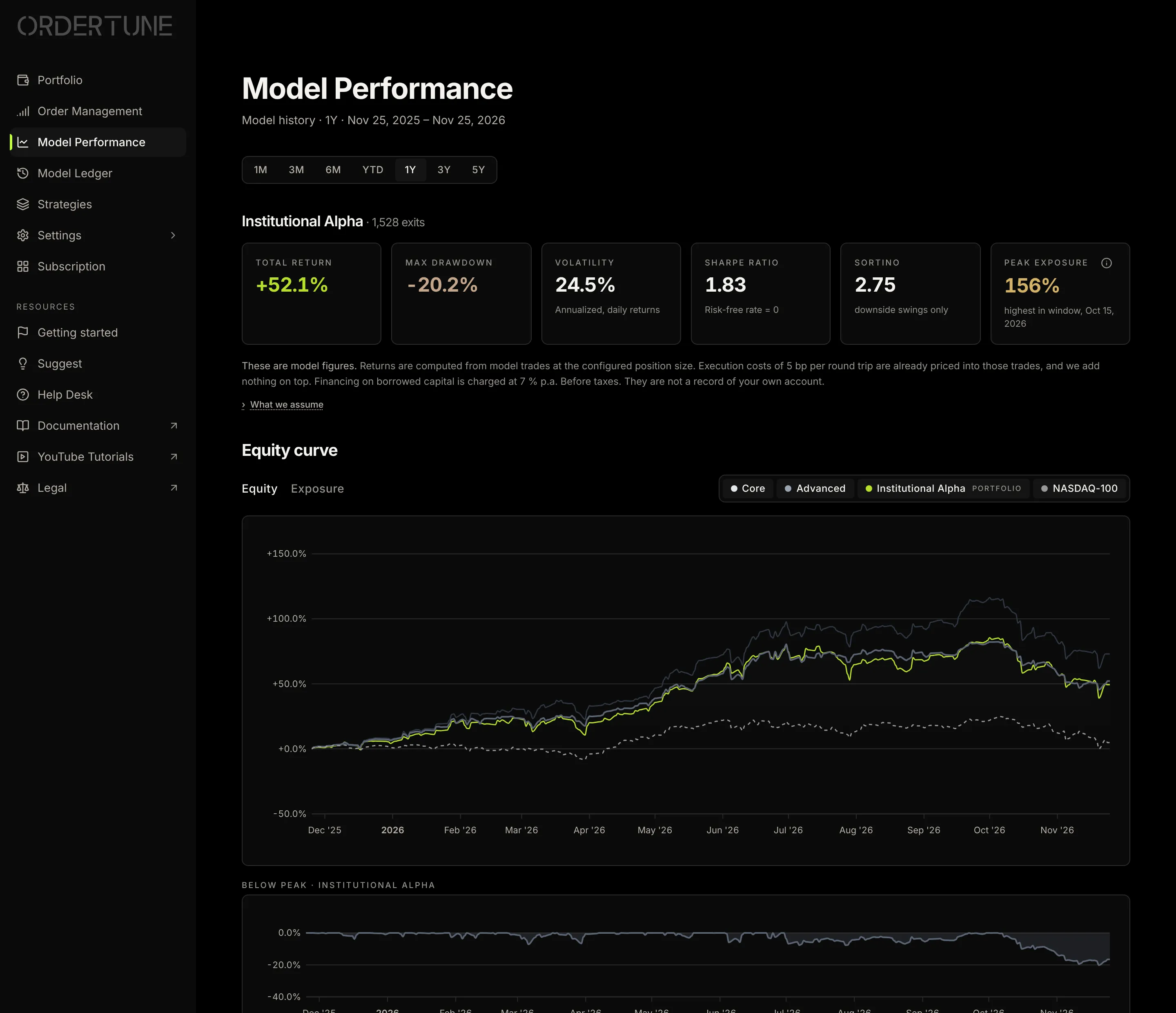
Model Performance, rendered from the app’s code with the public model data of 25 November 2026: Institutional Alpha, one year, at the suggested size.
What you see on /performance:
Six metrics — return, max drawdown, volatility, Sharpe ratio, Sortino ratio and peak exposure. Recomputed for whatever range and position size you have selected.
Equity, drawdown and exposure as three views of the same window — including when the capital was working and when it was waiting.
Ranges from one month to the full history, which starts in January 2000.
All three tiers on one chart, against the NASDAQ-100, so you can see what each subscription level would actually have done.
Your own portfolio as a fourth line, once a broker is connected. The gap between your curve and the model curve is what skipping signals cost you.
Your Account, Next To The Model
Am I executing the system, or am I editorialising?
Connect Interactive Brokers and the App stops guessing. It reads your real positions and holds them against the model — in three places, none of which require you to keep a spreadsheet.
Held outside Ordertune
The positions in your account the model never asked for. They are listed, they are yours, and nothing here will touch them — but you can see at a glance how much of your book is running off-system.
Your exits, matched to your lots
Exits are computed against the shares you actually hold, first in first out — not against what the model holds. If you entered late or entered half, the exit is sized to your position, not the model’s.
Your curve as a fourth line
Once a broker is connected, your own equity curve joins the three tier lines on the performance chart. The distance between your line and the model line is the price of every signal you skipped.
Model Ledger
Filter it, sort it, audit it. The stop-outs are in there too.
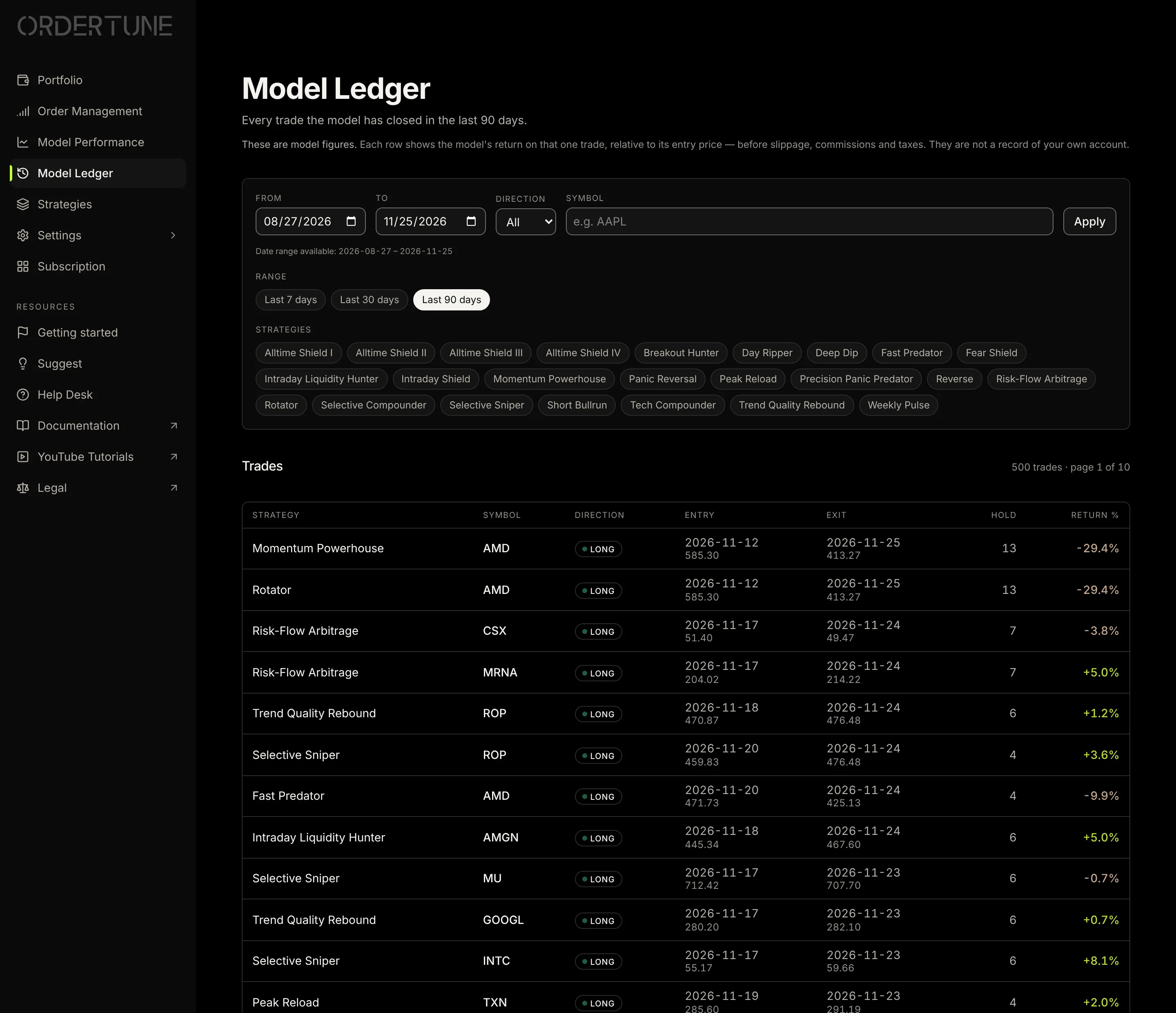
Every trade the model closed in the last 90 days, with strategy, direction, entry, exit, holding period and return. Filter by strategy or side, narrow the window, inspect any row. The full history back to January 2000 lives one page over, on Model Performance.
The Model Ledger, rendered from the app’s code with the public data of 25 November 2026.
We do not curate the success stories. The list above is the real one as the public data stood on 25 November 2026, in the order the trades closed. It opens with two AMD trades at −29.4 %. The only edge worth paying for is the one that survives full-sample disclosure.
Tiers
Same App. More of the model.
Every tier ships with the full App at interactive.ordertune.com — the same Order Management, the same Performance page, the same Ledger. What scales with the tier is how much of the strategy portfolio you receive, and whether you can connect Interactive Brokers through the Bridge.
Ordertune Core
€129 / month, plus VAT.
A curated selection of strategies — the mean-reversion and swing core of the portfolio. Full App, full ledger, full performance history. You release every order yourself with one click; the bridge on your own server places it in your own Interactive Brokers account.
Ordertune Advanced
€279 / month, plus VAT.
A broader selection with additional strategies and different approaches, so the risk is spread more widely. Connect Interactive Brokers through the Ordertune Bridge and release entries with one click instead of typing them.
Institutional Alpha
€489 / month, plus VAT.
Every strategy, long and short, across mean reversion, deep dip, momentum, swing, seasonality and intraday. The diversification is the product. Bridge execution and priority support included.
Why Proprietary
Most signal services rent infrastructure. We don’t.
Every shortcut a competitor takes is a leak in the value you are paying for. Here is what we refuse to outsource.
No marketplace. No Discord. No Telegram bot.
Three failure modes we don’t import: delivery that depends on someone else’s rate limit, a trade history nobody can verify, and a platform owner who can suspend your access overnight.
No third-party app fees siphoned from your subscription.
Every euro pays for what actually moves the needle: data feeds, strategy research, and infrastructure that does not blink during a market open.
Source code, database, execution path. All ours — or yours.
When something breaks, we fix it. And the one piece that touches your broker does not run here at all: the Bridge is open source and runs on your machine, so you can read exactly what it sends.
How we keep you safe
Stripe billing · passkey or authenticator · no broker password ever · GDPR-compliant data
We never touch your money. Interactive Brokers is reached through the Bridge on your own machine, using IBKR’s local interface — there is no broker password or API key stored with us, because there is none to store. A second factor is required before any broker connection can be created: a passkey or an authenticator app, your choice, and you can sign in with the passkey alone. Subscriptions are processed through Stripe Managed Payments, with Stripe as merchant of record, so we never see card data.
Core is your entry into systematic trading. A curated selection of institutional strategies follows fixed rules on the Nasdaq-100. Every signal — every entry, every exit — appears in your Ordertune App. Execution stays fully in your hands.
Who It's For: Core suits smaller portfolios and anyone who wants to start trading systematically. As your capital grows, Advanced spreads the risk across a broader selection of strategies. We don't sell financial advice; we sell a clear, repeatable protocol that you decide to follow.
Broader Diversification. Built for Growing Portfolios
€279
excl. VAT
Selected strategies with live signals
Broker connection (IBKR via the bridge)
One-Click Execution via your own Interactive Brokers account
Advanced adds strategies with different approaches to the selection. That spreads the risk and is designed to smooth the equity curve. You release each signal yourself in the Ordertune App. Only then does the bridge on your own server collect what you released and place the order in your own Interactive Brokers account. We never hold your broker credentials, and nothing is ever executed that you did not release.
The Requirement: You follow the rules, even when it feels wrong in the moment. Advanced is for those who trade with discipline, not for those who need to be right. All it takes is a cool head.
Full Strategy Suite. Built for Scale
€489
excl. VAT
All strategies with all signals, long and short
Broker connection (IBKR via the bridge)
Additional Diversification Strategies for Larger Books
One-Click Execution via your own Interactive Brokers account
Built for Capital that Outgrows Single-Strategy Risk.
At higher capital levels, the same strategy set produces larger positions — and concentration, slippage and market impact start eating into your edge. Institutional Alpha addresses this with the full strategy portfolio: additional, weakly correlated strategies on both the long and the short side, built specifically for diversification at scale. More strategies, smaller per-position exposure, a smoother equity curve.
Who This Is For: This tier is for serious capital. Below roughly $200k, Advanced delivers the same core without paying for diversification you don't yet need. Above that threshold, the broader setup starts working for you. The short strategies require a margin-enabled brokerage account. Consistent adherence to the protocol is expected.
Strategies per tier
Which trading strategies you get with which Ordertune tier. Access is determined by the tier you subscribe to — not by how long you have been a member, and not by account size.